D365 License Validation Changes
Microsoft has announced that significant changes to Dynamics 365 License Validation will take effect from 15 January 2026. These updates apply to all Finance and Operations applications and will begin impacting customers as their contract renewals or anniversary dates fall after this point.
The new validation approach is part of Microsoft’s wider effort to tighten licensing compliance, ensure correct user allocation, and align customers more closely with the security and governance standards of the Dynamics 365 platform. As organisations expand their use of D365, accurate licensing becomes increasingly important — not only for cost control but also for maintaining audit readiness and avoiding unexpected service interruptions.
For many businesses, these changes may require a review of current user roles, access levels, and licensing assignments to ensure they remain compliant under the updated rules. Customers approaching renewal dates after January 2026 should plan ahead, assess their licensing footprint, and confirm that their configuration aligns with Microsoft’s revised validation criteria.
AX Software will continue to monitor Microsoft’s guidance and can assist organisations in understanding the impact of these changes, reviewing their licensing structure, and preparing for a smooth transition as the new validation model comes into effect.
Why Am I Getting a D365 Licence Message?
As the new D365 License Validation process began in mid‑January 2026, users with licence start dates later in the year may not have seen Microsoft’s initial notifications. For example, if your D365 licence renewal falls on 26 November, validation will occur at that renewal point — meaning you have until that date to ensure your licensing is fully compliant. Any customers who have been granted a grace period will continue to have that status honoured.
At AX Software, we actively encourage clients to carry out annual reviews, and part of that process includes reassessing their licensing position to ensure continued compliance.
Ideally, your Microsoft Partner should be keeping you informed about changes like these so that business‑as‑usual is never disrupted. If they are not, it may be time to consider working with a partner that takes a more proactive — and often more cost‑effective — approach to maintaining and supporting your Dynamics ERP system.
Review Your D365 User Licenses
To maintain continuous access and avoid future disruption, we recommend that organisations begin proactively reviewing and validating their D365 user licences as soon as possible. With Microsoft’s updated License Validation process now in effect, ensuring that every user has the correct licence assigned is essential for uninterrupted operations.
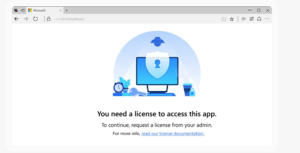
Users who do not have an assigned licence will lose access to applications once technical validation is applied. Instead of being able to continue working, they will receive prompts instructing them to request the appropriate licence from their administrator. Addressing licence assignments early prevents unnecessary downtime and keeps your teams productive during and after the validation period.

D365 License Housekeeping
Some organisations maintain more licences than they actually need — for example, when an employee leaves and their licence is not reassigned or removed. Regular licence housekeeping helps identify these oversights, and a simple audit can often deliver meaningful cost savings.
If additional licences are required, it is equally important to ensure your organisation remains fully compliant. With Microsoft’s updated validation rules, correct licensing is now both contractually and technically essential. The system will not operate properly without compliant licence assignments, making proactive housekeeping a critical part of maintaining smooth and uninterrupted D365 operations.
D365 Licence Housekeeping Checklist
To help maintain compliance and ensure smooth Dynamics 365 operations, the following licence housekeeping checklist provides a structured approach to reviewing and managing your D365 user licences.
- Review All Active Users – Confirm every active user has the correct D365 licence assigned and remove duplicate or legacy accounts.
- Remove Licences for Departed Employees – Disable accounts for users who have left the organisation and reassign or remove their licences.
- Reassign Licences for Role Changes – Ensure licence types match current job roles and remove elevated licences from users who no longer require them.
- Validate Licence Types Against Actual Usage – Compare assigned licences with real usage patterns and confirm specialist roles have the correct licence category.
- Check for Over‑Licensing – Identify unused or inactive licences and review billing to ensure you are not paying for surplus licences.
- Check for Under‑Licensing – Ensure all users, integrations, service accounts, and automation processes have appropriate licences assigned.
- Review Security Roles & Access Levels – Validate that assigned roles align with licence types and remove unnecessary elevated permissions.
- Validate Environment Access – Check user access across Production, UAT, Test, and Sandbox environments and remove access where not required.
- Prepare for Renewal or Anniversary Dates – Identify your organisation’s D365 licence renewal date and complete housekeeping before Microsoft’s validation occurs.
- Document Your Licence Position – Maintain records of licence assignments, role changes, and adjustments for audit readiness.
- Schedule Regular Licence Reviews – Conduct quarterly or annual licence audits and align licence housekeeping with organisational changes.
D365 Licence Audit
To support customers undertaking a D365 License Validation, we provide a dedicated licensing advisory service designed to help you:
Understand licensing requirements: Review the Dynamics 365 licensing model to gain clear insight into how security roles, duties, and privileges map to specific licence types.
Review user role and licence mapping: Use the Power Platform Admin Center or Dynamics Lifecycle Services reporting to generate a high‑level summary of active users and their corresponding licence requirements.
Achieve role‑to‑licence optimisation: Leverage the License Usage Summary Report in Dynamics 365 Finance and Operations to identify opportunities to optimise user role assignments by removing unnecessary entitlements or permissions.
Align licence assignments in the Microsoft 365 Admin Centre: Provision and assign the correct licences to users in the Microsoft 365 Admin Centre, ensuring they match the licence types identified in your reports. Where required, make reservations or place supplemental orders for additional licences.

D365 HR Functionality to Support Licence Audits
We have already highlighted an approach to managing licences above, but best practice is to implement supporting functionality from the outset — and that begins with D365 HR and the employee record. Dynamics 365 HR allows organisations to define structured onboarding and offboarding procedures, incorporating workflow or features such as Task Management. These capabilities enable automated notifications to the team responsible for licence management, ensuring they are alerted to new starters or leavers with the prompts and conditions needed to make accurate D365 licence validation decisions.
Combine this with an annual headcount report to establish the updated user base, and you quickly develop a business process that aligns D365 users with D365 user licences. It’s a belt‑and‑braces approach that strengthens your overall D365 implementation and helps eliminate siloed working practices that contribute to inefficiency.
Without these processes in place, organisations risk burning cash unnecessarily — either through wasted time resolving avoidable issues or by paying for licences assigned to “empty seats.” Implementing structured HR‑driven licence governance ensures compliance, reduces waste, and supports a more efficient ERP environment.

Contact AX Software
If you would like to learn more about how this type of process can be configured to support your business, our team is ready to help. Whether you need guidance, clarification, or deeper insight into D365 licensing and optimisation, simply get in touch and we will be happy to assist.
We look forward to supporting your Dynamics 365 journey.