D365 License Validation Changes
D365 License Validation – Microsoft has announced that, starting from 15th January 2026, changes will occur to D365 License Validation for finance and operations applications that begin for customers with contract renewals or anniversaries occurring after that date.
Why Am I Getting A D365 Licence Message
As the new D365 License Validation started mid-January 2026, D365 users will license start dates that began later in the year may miss the initial Microsoft notifications. For example, if you have a D365 licence renewal in, say, November 26, then D365 license validation will occur at the point of renewal and you therefore have until Nov 26 to ensure that your licensing is compliant. (Any customers granted a grace period will continue to have that status honoured).
At AX Software we actively encourage our clients to conduct annual reviews and part of that process is to re-assess the situation with regards to licensing.
Hopefully your Microsoft Partner company is keeping you up to speed with these changes so that business as usual is never compromised by changes like this but if they are not maybe time to consider talking to a partner company with a more pro-active and potentially more cost effective approach to maintaining your Dynamics ERP system.
Review Your D365 User Licenses
To maintain continuous access and reduce disruptions in the future, we recommend that organisations immediately begin the process of proactively starting your D365 License Validation
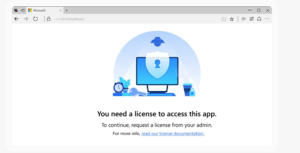
Users without assigned licenses will no longer have access to applications after technical validation until licenses are assigned and will instead receive prompts to request the appropriate licenses from their administrator.

D365 License Housekeeping
Some customers maintain too many licences (e.g. if an employee leaves and the organisation omits to reassign or remove a licence) and therefore a licence audit can save money.
If additional licences are needed, then it is of course good practice to ensure that your organisation is compliant and now technically (as well as contractually) essential insofar as the system won’t operate properly without compliant licensing.
D365 Licence Audit
To help customers conduct a D365 License Validation we provide a licensing advisory service, which will help you to;
Understand licensing requirements: Review the licensing model for clarity on how security roles, duties, and privileges map to license types.
Review User Role and License Mapping: Use the Power Platform admin center or Dynamics Lifecycle Services reporting to generate a high-level summary of active users and respective license requirements.
Achieve role to license optimization: Use the License Usage Summary Report in Dynamics 365 finance and operations to identify opportunities to optimize user role assignments by removing unnecessary entitlements or permissions.
Align license assignments in Microsoft 365 Admin Centre: Provision and assign the appropriate licenses to users in the Microsoft 365 Admin Centre, ensuring they match the license types mapped in the reports. If needed, make reservations or place supplemental orders for additional licenses.

D365 HR Functionality to Support Licence Audits
We have highlighted an approach to help manage licenses in a point above but good practise would be to implement functionality at the start and that begins with D365 HR and the employee record.
D365 HR functionality will allow a business to specify on-boarding and off-boarding procedures which allow you to incorporate either workflow or features such as Task Management. These give you the potential to notify the team responsible for licence management of new starters or leavers with prompts and conditions that help them make a D365 license validation determination.
Tie this in with an annual headcount report to get the new headcount balance and before you know it you have a business process that tallies D365 users with D365 User Licences. Its a belt and braces approach we think provides business with a robust D365 implementation, it helps remove those silo’s of work practise that contribute to inefficiency.
Without such processes you may simply be burning cash needlessly, either wasting time and effort trying to resolve issues that need not be present or wasting licenses on ’empty seats’.

Contact AX Software
To find out more about how this type of process could be configured to help support your business contact or call us and we can give you some insights
Contact Page